
Good story structure is a tool, not a rule. The right framework helps you shape emotion, reveal character and guide readers from first line to final page. This article explains 15 proven storytelling methods and shows exactly how to plan, test and publish those ideas using EBOKIO Publishing — from the Writing Studio beat sheets to AI covers, discovery tests and live dashboard iteration.
Why structure matters — and why EBOKIO fits the author workflow
Structure gives choices a framework. It clarifies where tension belongs, how character arcs resolve and what to show or withhold. EBOKIO Publishing bundles planning and publishing tools so you can move from outline to live eBook without switching apps: the Writing Studio stores your beat sheets and chapter drafts, Muse and AI Author Co‑pilot help rewrite sections, and the platform’s auto‑detected EPUB/DOCX upload generates a reader file instantly (how it works).
How to use this guide
For each method below I summarize the core idea, give a short writing tip, and show one or two concrete ways to apply the method inside EBOKIO — from beat templates to discovery testing and cover variants.
1. Three‑act structure (Setup / Confrontation / Resolution)
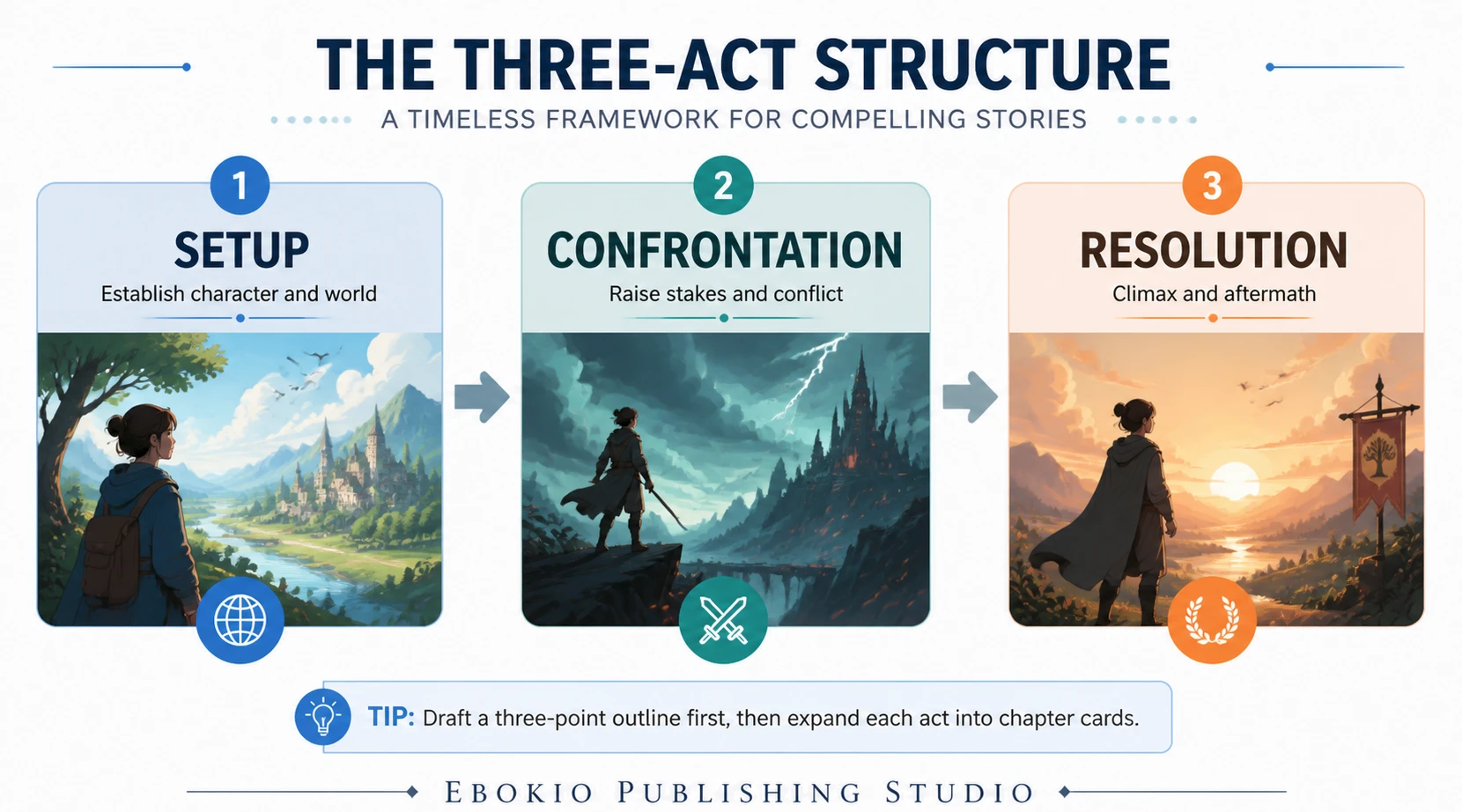
Core idea: Break the story into setup (establish character and world), confrontation (rising stakes) and resolution (climax and aftermath). Keep scenes targeted to one dramatic function.
-
Tip: Draft a three‑point outline in the Writing Studio, then expand each act into chapter cards.
-
EBOKIO action: Use the Studio’s beat‑sheet templates to tag chapters by act and export a reader‑ready EPUB when you’re ready to publish (features).
2. Hero’s Journey / Monomyth
Core idea: Follow a protagonist through departure, initiation and return. Useful for quest narratives and character transformation.
-
Tip: Map the 12 stages to chapters or sequences; assign a clear temptation or lesson to each stage.
-
EBOKIO action: Build a story bible in the Studio with scene notes for each Hero’s Journey stage; keep the bible linked to specific chapter files so revisions stay organised.
3. Save the Cat — Blake Snyder’s 15 beats
Core idea: A 15‑beat beat sheet designed for screenwriters that translates well to novels — clear moments for sympathy, debate, midpoint and finale. See the original 15‑beat list for reference (Save the Cat).
-
Tip: Use Save the Cat beats as milestone checks rather than rigid deadlines.
-
EBOKIO action: Load Save the Cat beats into the Studio’s beat‑sheet template, then use Muse AI or AI Co‑pilot to flesh weak beats with scene suggestions. When done, generate multiple cover variants to match the tone.
4. Freytag’s Pyramid
Core idea: A five‑part shape — exposition, rising action, climax, falling action, denouement — useful for mapping escalation and release (Freytag).
-
Tip: Label key turning points on the manuscript timeline so pacing issues show up early.
-
EBOKIO action: Use chapter summaries and the platform’s built‑in reader features (chapter summaries, bookmarks) as internal rehearsal: the platform’s reader experience exposes pacing to early testers.
5. Kishōtenketsu (four‑part structure)
Core idea: Introduction, development, twist, conclusion. Emphasizes contrast and revelation over conflict (Kishōtenketsu).
-
Tip: Reserve the twist as a perspective shift — not necessarily violence — and use small clues earlier to reward re‑reading.
-
EBOKIO action: Use the platform’s “Ask This Book” feature during pre‑release to see which queries surface the twist; adjust wording in your blurb and metadata accordingly to improve discoverability.
6. In medias res
Core idea: Start in the middle of action then fill backstory later. It creates immediate momentum.
-
Tip: Drop readers into a scene that raises questions; answer them via flashbacks or character reactions.
-
EBOKIO action: Publish a short first‑chapter sample and use the live dashboard to watch read‑through metrics. If completion rates drop early, adjust the following chapter’s hook and republish — the platform supports quick iterations and fast review turnarounds on paid plans (pricing).
7. Non‑linear narrative
Core idea: Tell events out of order to reveal character through contrast. Requires discipline to avoid confusion.
-
Tip: Maintain a timeline file to ensure causality remains clear to the reader.
-
EBOKIO action: Use the Studio’s chapter cards to label scenes by date and viewpoint; export a printable timeline for beta readers from the Studio notes.
8. Frame story
Core idea: A story inside a story provides perspective and commentary. Classic examples include Canterbury Tales and Emma Donoghue’s Room.
-
Tip: Make the frame’s voice distinct enough to justify its presence.
-
EBOKIO action: Store the frame narrator’s research and notes in the Studio and attach those files to metadata so your publication page can use them in the editorial notes, enriching reader context on the storefront (ebooks).
9. Multiple viewpoint / ensemble
Core idea: Alternate viewpoints show different truths and create dramatic irony. Keep each voice consistent.
-
Tip: Assign a colour or tag to each viewpoint in the Studio to avoid voice drift.
-
EBOKIO action: Use chapter metadata to mark viewpoint and let the reader’s progress sync across devices with cloud progress — useful when chapters jump perspective frequently.
10. Epistolary
Core idea: Tell the story via documents — letters, transcripts, logs. It creates immediacy and authenticity.
-
Tip: Use varied formats within the epistolary frame to maintain momentum.
-
EBOKIO action: Upload DOCX or EPUB; the platform auto‑detects chapters and formats them for readers so your letter‑style layout remains intact on all devices (upload details).
11. Psychological / unreliable narrator
Core idea: The narrator’s bias or gaps become a device. Clues must be subtle but consistent.
-
Tip: Plan the reveal in the Studio and test with beta readers; misdirection loses power if readers spot it too early.
-
EBOKIO action: Use the platform’s internal beta release workflow and the 24‑hour review SLA on Premium/Pro plans to cycle quick revisions when beta feedback arrives (pricing).
12. Reverse chronology
Core idea: Start at the outcome and move backward. It reframes motive and consequence.
-
Tip: Keep anchor details consistent so each backward step adds context rather than confusion.
-
EBOKIO action: Offer a free sample of the earliest (chronologically last) chapter and measure whether readers buy the rest — use live revenue and read‑through metrics in your dashboard to judge effectiveness.
13. Quest structure
Core idea: A character seeks an external object or goal; the journey produces inner change.
-
Tip: Track tangible milestones along the quest and ensure each obstacle tests character growth.
-
EBOKIO action: Tag milestones in the Studio and create a discovery‑focused blurb; EBOKIO’s AI Librarian can surface quest keywords when readers search naturally, so optimize metadata using the platform’s AI suggestions.
14. Modular / short‑form vignettes
Core idea: A novel or collection built from short scenes that together form a larger picture. Works well for theme‑driven books.
-
Tip: Ensure each vignette has its own mini‑arc while contributing to the whole.
-
EBOKIO action: Use the Studio to manage independent chapter files as stand‑alone uploads; the platform keeps chapter summaries and bookmarks so readers can dip in and out without losing progress.
15. Iterative / experimental structure (looping gadgets)
Core idea: Structures that repeat with variation — useful for speculative or experimental fiction. The pattern itself becomes part of the story.
-
Tip: Use iteration to reveal change — each loop should show difference.
-
EBOKIO action: Rapidly publish incremental drafts to a small promo audience, watch completion metrics and reader feedback in the dashboard, then iterate covers, blurbs and price from one place.
Practical workflow: From beat to live book inside EBOKIO
1) Choose a method and open the Studio. Create a beat‑sheet (Save the Cat, Hero’s Journey or a simple three‑act outline).
2) Draft scenes in discrete chapter files and tag them (viewpoint, act, beat).
3) Use Muse or AI Co‑pilot to rewrite weak scenes or generate alternative openings.
4) Generate AI covers and test 3–5 variants.
5) Upload DOCX/EPUB; EBOKIO auto‑detects chapters and prepares the buyer file.
6) Publish and promote, then monitor reads, completion and discovery via the live dashboard.
7) Adjust metadata, cover and price quickly and republish — Premium and Pro plans offer faster review SLAs and higher royalties, with Pro delivering up to 90% of net receipts for serious authors (pricing).
Discovery and iteration — how structure helps find readers
Structure does more than satisfy craft; it helps metadata and discovery. EBOKIO’s AI Librarian surfaces titles using natural‑language queries, so clear themes, well‑phrased blurbs and accurate chapter summaries improve match rates. Use the platform’s AI metadata suggestions and run short promos while watching the dashboard to see which structural choices boost reads and completion.
Where EBOKIO gives you an edge
-
Integrated workflow: Plan, write and publish without juggling separate tools; the Studio, AI assistants and one‑click export reduce friction (features).
-
Fast iteration: Paid plans have 24‑hour review SLAs so you can deploy fixes quickly; free plan reviews take 4–6 working days, which is still faster than some legacy vendors (how it works).
-
Reader features that test structure: built‑in TTS, Ask This Book, chapter summaries and cloud progress give real user signals you can read in the dashboard.
-
Clear economics and rights: non‑exclusive terms, monthly payouts and high royalty tiers (up to 90% on Pro) make decisions simple for UK and EU authors (pricing).
FAQ — common questions answered
How do I structure a story?
Start with one method that suits your idea — three‑act for conventional plots, Hero’s Journey for quests, Save the Cat for beat‑driven pacing. Draft a beat‑sheet in EBOKIO’s Writing Studio, tag chapters by function and iterate with AI assists until each beat reads as a clear step.
What are the best storytelling methods for novels?
There is no single best method. Use three‑act or Save the Cat for plot‑heavy novels, Kishōtenketsu or modular vignettes for literary work, and Hero’s Journey for epic arcs. EBOKIO supports all these workflows with templates, AI support and testing tools to help you choose.
How long does it take for my ebook to go live on EBOKIO?
Review times depend on plan: Premium and Pro titles are usually reviewed within 24 hours; free plan reviews typically take 4–6 working days. After approval, your title appears on the storefront and collects live metrics in the dashboard (pricing).